




















From digitisation of receipts to reimbursement, Continia automates every stage of the expense reporting process.
Automated expense management
As you know, having to manage travel receipts or any other activities related to business expenses means losing something very precious: time.
Continia Expense Management is a solution that lets you simplify the recording and validation of travel-related activities using your smartphone, a web browser and Microsoft Dynamics NAV. It also gives you a day-by-day overview of your credit card spending, directly on your website. Microsoft Dynamics NAV.
Continia makes the tedious process of reporting expenses obsolete.
Available at your fingertips : record your expenses in one click
Reçus physiques
Reçus électroniques
Déplacements
With the Expense Management app, simply take a photo of your receipt and quickly fill in the customisable form. When abroad, you can use the application offline to avoid roaming charges.
With the Expense Web portal, you can save receipts sent by e-mail directly, then fill in the same customisable form as in the Expense Management application.
You can also register your business trips by vehicle, both via the application and via the web portal.
These recordings are transmitted directly to Microsoft Dynamics NAV, where the accounting department can take over. Employees on business trips no longer have to draw up an expense claim. The result: considerable time savings for both the employee and the accounting department.
Simple data retrieval, manually or automatically
Continia Expense Management allows you to import the employee’s credit card consumption directly into Microsoft Dynamics NAV and automatically link each expense to a recorded receipt.
Manually
Thanks to Continia Expense Management’s import function, you can export an account statement file from your bank’s website and then import it directly into Microsoft Dynamics NAV.
Automatically
Simplify your work by fully automating your credit card transactions. Continia will communicate directly with your bank.

Hunting down expense claims? That’s all history now!
With Continia Expense Management and its intelligent matching technology, you can now automatically link a receipt to the corresponding credit card transaction without any intervention from the accounting department.
No need to check that all receipts for credit card transactions have been sent to you. You will automatically receive an overview of transactions for which no receipts have been received. Continia Expense Management will then send a message to the employee on the move, as well as an e-mail containing the details of the missing receipt.
This gives the accounts department a tool for managing the consumption of employees on the move, so that everything is documented simply and easily. Accounting is back in control!
A direct acces, from NAV
With Continia Expense Management, you have access to receipts linked to a specific accounting entry or to receipts linked to a project. You can then open them from the overview in Microsoft Dynamics NAV. This will make it easier for you to validate, as well as for internal controls and accounting purposes.
Managing your expense reports becomes child’s play
Once the receipt has been recorded, you don’t have to do a thing – the accounting system takes over! There’s no need to write up an expense claim when you get home.
The accounts only use Microsoft Dynamics NAV to collect receipts and travel data. Activities are recorded in the form of an accounting entry. Like all transactions, travel statements are managed in NAV.
The activities of employees on the move are recorded day by day in the Microsoft Dynamics NAV, so that you have a real-time overview of company expenditure directly in your financial management system.
Microsoft Dynamics NAV ensures that everything is correctly accounted for. You will find details of the expense claim on the left of the screen and an image of the receipt(s) on the right. In this way, the accounts department can quickly allocate a hotel bill to different account numbers, for example, depending on whether the expenses relate to accommodation or catering.
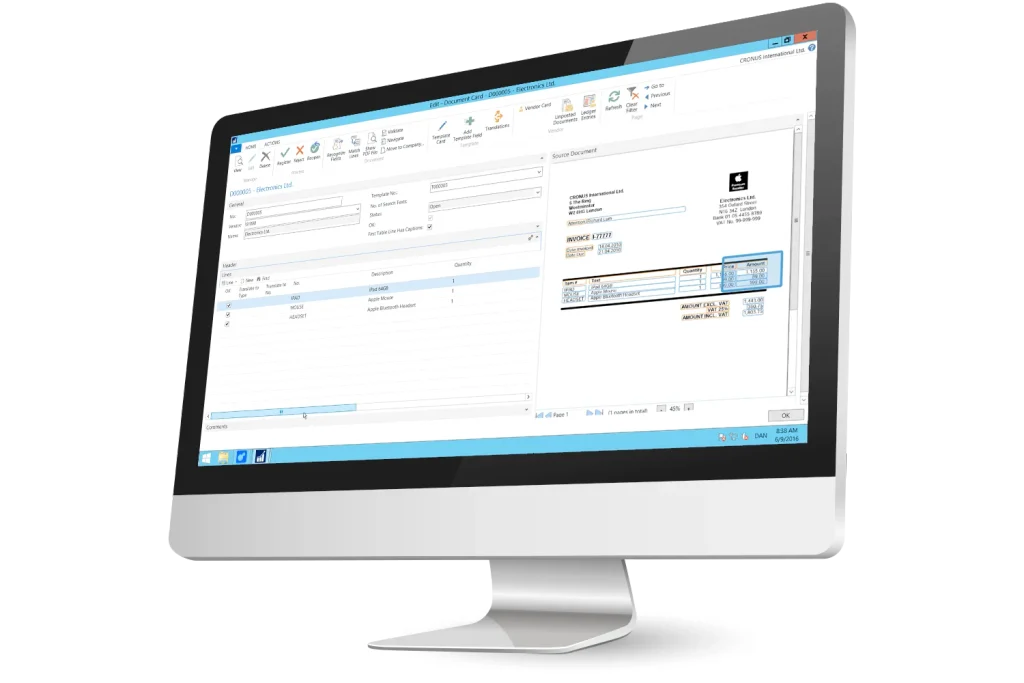
Automatic deduction of VAT on even the smallest receipts. Each account entered individually is affected by tax and VAT rules, so no manual intervention is required.